Topic 9
Routers, DAOs and Controllers
an this topic we will start to look at how we can make our code more modular by writing routers and also how we can write middleware in modules. Specifically we will look at:
- Using the Express router to organise and group routes;
- Writing middleware in modules
- Using DAOs and controllers
Express Routers
Having looked at modules, we will now look at how to implement an Express router as a module.
Implementing an Express Router as a Module
In a larger application, you will quickly find that your main Express server source file (often server.ts) will become very large, handling a large number of routes. What you can do instead is to define a Router. A router allows you to set up a group of routes which match a particular path. For example we might create a router matching the path /products which will handle any routes beginning with /products, e.g: /products/all, /products/id/:id and so on. To do this we create a routes folder within the folder containing our main Express server, and place a route handler in there, which would be saved as a Node module. Here is an example router module (product.ts) which we would save in our routes folder:
Note how we are making productRouter the default export from this module, which means we'll be able to import it as follows:
This is shown in the full Express application, below:
So the song router is imported from the routes/product module (corresponding to routes/product.ts) and then we call use() with two arguments:
/products, indicating that this router will handle all URLs beginning with/products;- The router object itself.
So, the route /products/all will be handled via the product router (as the route begins with /products) and then via the /all route within the products router.
Further Middleware
Last time you were introduced to middleware. However, we wrote our middleware in our main server.ts which is not ideal for reusability. We saw examples last week of standard middleware such as express.json() so it is valuable to write middleware in its own modules so that it can be imported into other projects. As an example we will look at a piece of middleware which logs the time of the request and the URL requested (i.e. req.originalUrl).
Note how we create a middleware function logger and export it so it can be used in other files. If the filename was logger.ts inside a middleware folder we could then import it as follows:
and then use it:
Middleware-generating functions with parameters
Our example middlewares so far have not taken parameters. What, however, if we wanted to use a piece of middleware which takes parameters? For example in an item of CORS middleware, we might want to specify which clients are allowed to connect to the server via parameters.
To do this, we need to write a functions which creates and returns a middleware function. Here is an example of a function which creates our own CORS middleware to add the CORS Access-Control-Allow-Origin header to the response:
Note how myCors is a function which returns a middleware function. myCors() is not middleware itself, it is a function which returns middleware. We would use it as follows:
Remember that app.use() expects a piece of middleware. myCors() returns a middleware function which then becomes the argument to app.use(), which adds the CORS header to the response, specifying the allowedClient we passed in.
This pattern, of writing a function which returns a piece of middleware, is used extensively: in many other cases we give app.use() a function which returns a piece of middleware. For example express.json() works this way: express.json() isn't actually middleware itself, it's a function which returns middleware. Going back to last week, expressSession() is also a function which takes a series of configuration options and returns the actual middleware function for express-session.
Going back to the corsMiddleware function returned from myCors(), this adds the CORS Access-Control-Allow-Origin header to the response object to allow the specified client to connect, and then calls the next function in the middleware chain with next().
We would of course need to import myCors() before using it, e.g. if it's in a file myCors.ts within the middleware folder:
Creating a module to initialise the database
One problem with our code so far is that we have had to initialise and load the database multiple times, once in the main app, and once per router. This is clearly inefficient and wasteful. What we can do instead is to create a module to initialse and export the database connection:
As the database object is exported, we could then import it from every file which needs to use it, either the main application or any router:
or, from a router:
Data Access Objects
- We have already seen how to interact with an SQLite database from node.js
- However, we can make our code more structured and object-oriented (remember you did classes and objects last year)
- When writing object-oriented code to interact with a database, we typically deal with data access objects (DAOs).
- A DAO provides an interface to your table as a whole, and might contain methods such as findStudentById() or findStudentsByName()
- You have already met DAOs in OODD, so should be familiar with the general concept
Example of a DAO for the students table
Before we discuss the DAO in depth, note the first import:
What is this doing? It's importing a namespace from the better-sqlite3 package. Namespaces are intended to avoid duplicate types, functions and classes with the same name, and can contain, within them, types, function and class definitions. In the case of better-sqlite3, the BetterSqlite3 namespace contains a Database type, which we use here. To reference it we use BetterSqlite3.Database, implying we are using the Database type within the BetterSqlite3 namespace.
DAO - Explanation
- Note how the DAO contains a series of methods which perform various database operations
- The rest of our code would interface with the DAO, rather than the database directly, keeping it clean and keeping all the 'messy' SQL statements in one place
- Each method in the DAO performs a particular database operation (find a student by ID, find all students on a given course, add a student, update a student's details, and delete a student)
Controllers
We can further enhance the modularity of our code through the use of controllers. Controllers are part of the model/view/controller (MVC) architecture, in which we divide the code into three components:
- the model - those components which directly interact with the database, i.e. the DAO
- the view - those components used to present the data (i.e. output the data as JSON or as HTML)
the controller - which manages the interaction between the model and the view.
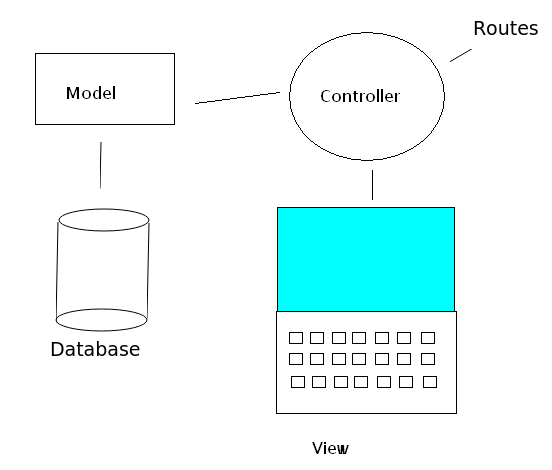
The typical role of a controller would be to communicate with the model (the DAO) to get database results, and then format those results to be presented to the client. Or, alternatively, the controller could gather information from the client and then forward it on to the model (DAO) to insert it into the database.
Hopefully, from this you may be able to figure out that the router takes the role of the controller. To improve the modularity of your code, however, you can create separate controller objects to represent the controller, and add methods to these objects to carry out the functionality of your router. Then, in your router, you create a controller object and call these methods from each route in the router.
A good way to organise your project is to have sub-folders within the main folder of your project for routes, controllers and DAOs. These folders could simply be named:
routescontaining all your route files;controllerscontaining all your controllers;daocontaining all your DAOs.
So, if we imagine a student router, within the routes folder:
Note how the router creates a StudentController object, passing the database connection to it (which will be needed by the DAO) and note also how we handle each route with methods of the controller object. Remember we looked at "bind()" in week 4. Here we are using it slightly differently. bind() is necessary here to preserve the context of the this object in callbacks. By default, the context of this (the current object) is lost in a callback function, and to preserve the context of this, you have to bind the callback to the object you wish to use as this (which will be the controller here).
So, let's look at the Controller object, which would be in the controllers folder:
Note how the methods of the controller object can act as route handlers, as they have the req and res parameters. Note also how they call the methods of the DAO and then format the data returned from the DAO as JSON, ready to be used by the client. Hopefully, by examining the code, you can see how the controller is acting as a "middle-person" between the model (the DAO) and the view (the client).
Using tsx in watch mode to restart a server on change
Something we haven't covered yet, but is easy to do, is: how can we automatically restart our server if we apply changes? We have done this on the front-end with a Vite dev server or vite-express, but not the back-end. Luckily it is easy, we simply start tsx in watch mode. See the tsx documentation for more.
We can simply update our package.json dev script to do this too, e.g:
Exercise
Routers
The exercise will allow you to practise with routers, DAOs and controllers.
IMPORTANT: This is a slightly more advanced topic, so you need to ensure you have completed the sessions and logins exercise from the previous topic.
Continue to work on your project from last week.
- Make a copy of your Express server from last week, so you still have the original version for reference.
- Create a separate router file, containing routes for users (login, logout). This should be named
users.ts, should create anexpress.Router()as shown in the second example, and should contain the three routes (/loginPOST,/loginGET and/logout). - Include the router you have just created in your main Express app under the top-level route
/users, as shown in the example. - As shown in the logging example, above, write the user-checking middleware (from last week) in a separate module as a function and export it. Then,
importit anduse()it in the main server file by specifying the name of the function exported from the module. - Test it out.
- Now, similarly, move all your routes to handle songs (i.e. everything you did in week 2) to a separate router inside the file
songs.ts. In the same way that you did for yourusersrouter, include this router under the top-level route/songs, and test it by searching for all songs by a particular artist by requesting the correct URL in your browser.
DAOs and controllers
Rewrite your Express server (above) to use appropriate DAOs and controllers as well as routes:
- First create a DAO and controller for songs.
- Next create a DAO and controller for user authentication management (i.e. login and logout).