Topic 10
Web Security
In this session we will look at security issues, including:
- Secure servers: TLS and HTTPS
- Password hashing
- SQL Injection
- Cross-Site Scripting and how to prevent it
- Session Stealing
What risks exist?
The most obvious security threats involve stealing of credit card information or passwords, and unauthorised access to a person's private space on websites (such as social media) leading to theft of confidential information and unauthorised creation, editing or deletion of content such as a social media messages.
A particular concern is identity theft, by which attackers, often known as crackers, can gather personal information about a person (such as name, address and date of birth) and use it to impersonate them, for example apply for credit cards in their name. Consequently personal information needs to be kept secure, and this is indeed a legal requirement due to the Data Protection Act.
Using an HTTPS (encrypted) server
One significant risk is interception of confidential data as it is sent from your machine to a server and back. By default, all data that you send to a server, and the response back, is sent across the web unencrypted. This means that it can be intercepted at intermediate points - web traffic passes through various servers and routers on its way to its final destination. Software known as packet sniffers can be exploited by crackers to steal confidential unencrypted data as it is sent from client to server and back. This kind of attack is known as a man-in-the-middle attack.
To prevent this, we need to set up an HTTPS (secure HTTP) server. HTTPS uses the TLS (Transport Layer Security) approach to encrypt the data as it leaves the origin, and unencrypt the data when it reaches the destination.
To enable HTTPS you need to obtain a certificate digitally signed by a certification authority (CA). The role of the CA is to confirm that you are who you say you are. Without a certificate from a trusted CA, it would be possible for an impersonator to setup an HTTPS site in an organisation's name, and convince people that they are the legitimate entity.
Formerly, you had to pay a fee to CAs to perform identity verification services, the best known in the earlier days being Thawte and VeriSign. Fee-charging CAs still exist: however it's now easy for non-profits and individuals to setup an HTTPS server with Let's Encrypt.
Cryptography
How is the data encrypted as it is sent across the web?
- Remember that sensitive data must be encrypted as it is sent across the web
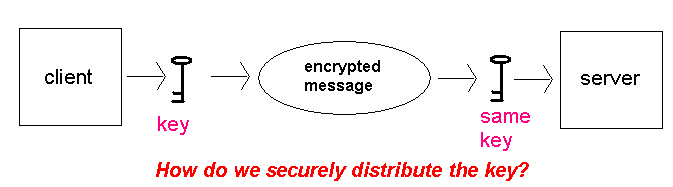
- Simplest approach is to encode and decode the data using a single electronic key (password)
- Not satisfactory, as the password must itself be transmitted insecurely
Public Key Cryptography
- Gets round the password problem
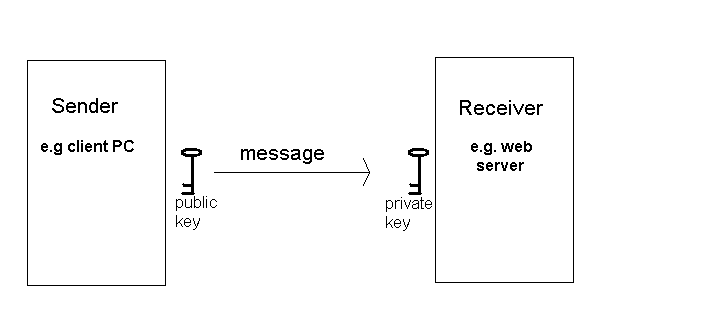
- One electronic key is used for encrypting the data (public key)
- Another is used for decrypting the data (private key)
- The website owner generates both at the same time
- Mathematically related, but by very complex algorithms which would take an unrealistically long time to crack
The Public Key
- Used for encrypting (encoding) the message
- Available to everyone
- So anyone can encrypt the data and send it to the server
The Private Key
- Used for decrypting (decoding) the message
- Only available to the recipient of the data
- e.g. the website owner
- So only the recipient of the data can decode it
Problem with Public Key Systems in Two-Way Secure Web Transactions
- There is still a problem with public-key cryptography in secure web communication
- The public key is used for encoding, the private key for decoding
- So the server has no way of encoding the response
- Since the response may be sensitive data too, it is important that it does
- How is this dealt with?
Getting Round The Problem - The Symmetric Key
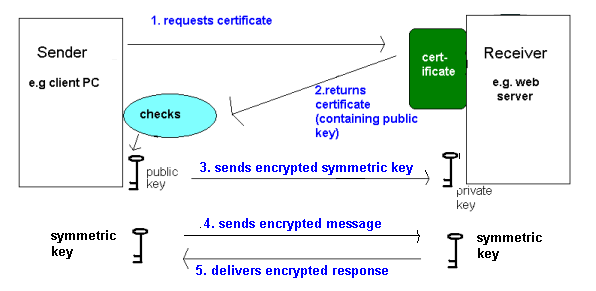
- Having accepted the public key, the client's browser generates a random symmetric key
- The symmetric key is used to both encode and decode the sensitive data
- The symmetric key will be used to encode the sensitive data
- The symmetric key is encrypted with the public key (so it can't be sniffed) and sent to the server
- The server decrypts the symmetric key with the private key
- The message is encoded with the symmetric key, and sent
- The server's response is encoded with the symmetric key, and decoded on the browser
- The symmetric key is unique to this session
Procedure with TLS
- The client makes a request to the server for a secure page, using https:// rather than http://
- The server then sends its certificate back to the client
- The client's browser checks the certificate in these ways:
- The CA that signed it is real; browsers keep a database of known CAs
- The expiry date hasn't passed
- The server name on the certificate (verified by the CA) matches the actual server
- If it's valid, the client accepts the public key (embedded within the certificate) from the server
Password hashing
For additional security, ensure that passwords are stored as a hashed (unreadable) form in your database, to prevent them being stolen. You can use Node's bcrypt module (which must be installed using npm install bcrypt) for this. For example, to hash (encode) a password when signing up:
The 10 is the number of rounds of encoding to use; 10 is a good compromise between security and performance as each round improves the security of the encoding but takes some time to execute.
To check a password when logging in, use code such as the following. Query the database to find the row for a given user, and then use bcrypt.compare() to compare the password entered against the hashed password in the table:
See here for more details.
Code vulnerabilities
Many security risks in web applications are at the actual code level, in other words crackers can exploit insecurely-written code to attack a database or even steal users' cookies. In the practical session we will take a look at two of the main security risks: SQL injection and cross-site scripting.
Exploring SQL injection and cross-site scripting with live examples
We will explore the security issues via a series of practical exercises on live examples. The source code for the live examples can be found on GitHub.
You should fork the repository:
clone your fork, and then install the dependencies with
There are two applications in the repository: hittastic and bogweed. The former is an insecure implementation of a regular website. The second carries out a form of security exploit which we will see later.
You can start the servers for both applications with:
The hittastic server will run on port 3000 and the bogweed server will run on port 3001.
Check that HitTastic! is working normally by logging in with any of the usernames and passwords in the ht_users table in the accompanying wadsongs database. Try searching for and buying some music, and then logging out.
Exercise 1
Answer to exercise 1
What has happened here is an SQL injection attack. SQL injection involves a cracker entering a fragment of SQL in an HTML form, or any other input to a web application. This fragment of SQL combines with an existing SQL statement within the application's code to cause something dangerous to happen, such as altering the admin password, deleting data, or logging in without knowing the correct credentials.
In our case the code contains this SQL:
For example, if the user entered in the form the following for the username:
and just password for the password, the query generated would be:
with potentially devastating results!!!
The attack you tried didn't quite go that far, but did allow access to the site without knowing proper login credentials. In your case you entered password for the password and fred' OR '1=1, so the resulting query will be:
This is interpreted as:
Select a row from
ht_userswhere EITHER the password is 'password' and the username is 'fred' (which will probably give no results) OR '1=1' (which is always true).
As 1=1 is an expression which always evaluates to true, the second condition will always return true and, therefore, the entire WHERE clause will evaluate to true, and every row will be matched. However the code then fetches the first row (normally there would only be one row) and this just so happens to be user JohnStevenson which is why you get logged in as John Stevenson.
Prepared statements and placeholders to prevent SQL injection
We have in fact been writing our code in a manner to prevent SQL injection all along. If you look at the code above, you will see it is unlike the code we've been developing so far. We've been using prepared statements with placeholders, which prevents SQL injection occurring. With prepared statements, the SQL statements are compiled (prepared) into a binary form, which is executed more rapidly by the database, and this binary form is cached and thus can then be re-used, improving the efficiency of your application. The placeholders (?) are replaced by the specified input parameters, and this method is not vulnerable to SQL injection.
Coding Exercise
Change any insecure SQL statements in the provided HitTastic! server to use prepared statements. In other words, change them to use the approach you have been using throughout the module until now.
Cross-site scripting
Login to HitTastic! as a standard user with a username and password.
Now visit the other application included in the repo, the bogweed application. Ensure hittastic is still running. You will be presented with a special offers page, inviting you to buy music from top artists such as Elvis Presley and Madonna as well as more questionable artists such as Woop at knock-down prices.
Exercise 2
Answer to exercise 2
This is an example of a cross-site scripting (XSS) attack. What is XSS?
- A subtle, easily-overlooked, but widely-exploited, security risk with untested input to a web application
- Attackers link to your site from phishing websites or emails advertising your site - such as the
bogweedsite presented here. - However, their links contain dangerous code embedded within a URL as a parameter
- This code can include:
- JavaScript code to perform a harmful action such as steal your cookies (including your session ID, with the result that someone could access your account)
- Fake HTML hyperlinks or forms
- If your site displays the input (and many sites do), your site will be fooled into running the injected code
- A very difficult problem to completely eliminate!
Basic, non-harmful XSS example
This is demonstrated by selecting the artist Woop from the Bogweed Marketing page.
- The usual way in which XSS attacks are done involve injecting harmful JavaScript
- This can be done by injecting <script> tags into the site, for example via hidden form fields or parameters within a link
- If you look at the Bogweed Marketing HTML, you will see this:
- Each "BUY" button is within a form which sends data to the
/buyroute on HitTastic! Each form contains a hidden field which passes across a valid ID plus some injected JavaScript or HTML which causes the XSS attack. If the server sends back the input:
then the server would unwittingly send to the browser the <script> tag stored in the form's hidden field, as it is part of the POST parameter
req.body.id(which corresponds to theinputfield with anameofid, i.e. the hidden field). So. it would send- ...and when the browser receives the <script> tag, it would run the JavaScript inside, because browsers process all tags returned from the server
- Result: user sees the message "666 I am an evil cracker hahaha" as a popup in their browser
Fake forms
A more dangerous example (seen in the Elvis example on the Bogweed Marketing site) is injection of a fake HTML form into the genuine site, so that a
tag is used in the attack rather than a <script> tag. In this form of attack, the user will be fooled into thinking that the form is provided by the genuine site, and might then enter their credit card details... which will be sent straight back to the attacker!For example:
Note how the hidden field now contains a complete HTML form which sends its data to the /steal route on http://localhost:3001 (i.e. Bogweed Marketing). This form asks the user to verify their HitTastic password, and HitTastic will display this form to the user. The user, unaware this form has come from Bogweed, will unwittingly enter their password and send it to Bogweed!
XSS and Cookie Theft with Embedded JavaScript
This is an even more dangerous XSS attack, involving embedded JavaScript within the links, which could steal user's cookies, including potentially, session cookies. In the Madonna example on Bogweed Marketing the hidden field contains something like this:
- Now the ID contains some embedded JavaScript to set the user's current web page (window.location) to
http://localhost:3001/stealcookieand sends user's cookies (accessible in JavaScript usingdocument.cookie) to this URL - The user will be taken to HitTastic!, but, as the ID is sent back to the user by the server, the JavaScript will immediately run (as in the first example) and redirect the user to
http://localhost:3001(Bogweed Marketing) - Bogweed Marketing will then have the session ID and can impersonate the original user by sending a request to HitTastic! containing the session ID in the
CookieHTTP header; the genuine website will then think they are the attacked user (this is session stealing) - If Bogweed are really nasty, they could then redirect the user straight back to HitTastic!, so the user will be unaware of the entire process
Hidden XSS attacks with URL encoding
- Normally the XSS crackers go to greater lengths than the above, to hide their attack and make it non-obvious
- It's possible to encode the entire injected JavaScript as URL encoded characters (e.g the letter 'a' would be encoded as %61, its ASCII code in hexadecimal, or the character '!' would be encoded as %21)
When the user moves over the harmful link, the injected JavaScript would appear as the URL-encoded version such as
However, the server would decode the URLs (e.g. convert %61 back to 'a') and treat the injected code as the actual JavaScript:
meaning the attack still takes place
Exercise 3
Answer to exercise 3
When you searched for "Woop" you saw an alert box come up. Why is this? An XSS attack has been previously inserted into the database. Look at the SQLite database and find songs by Woop; you should see what has happened.
For this reason you should either validate input to a database, or guard against XSS when outputting data (as this will not depend on where the XSS attack has come from)
Session stealing
You are now going to try session stealing. Run the third (Madonna) Bogweed XSS again, to obtain your session cookie:

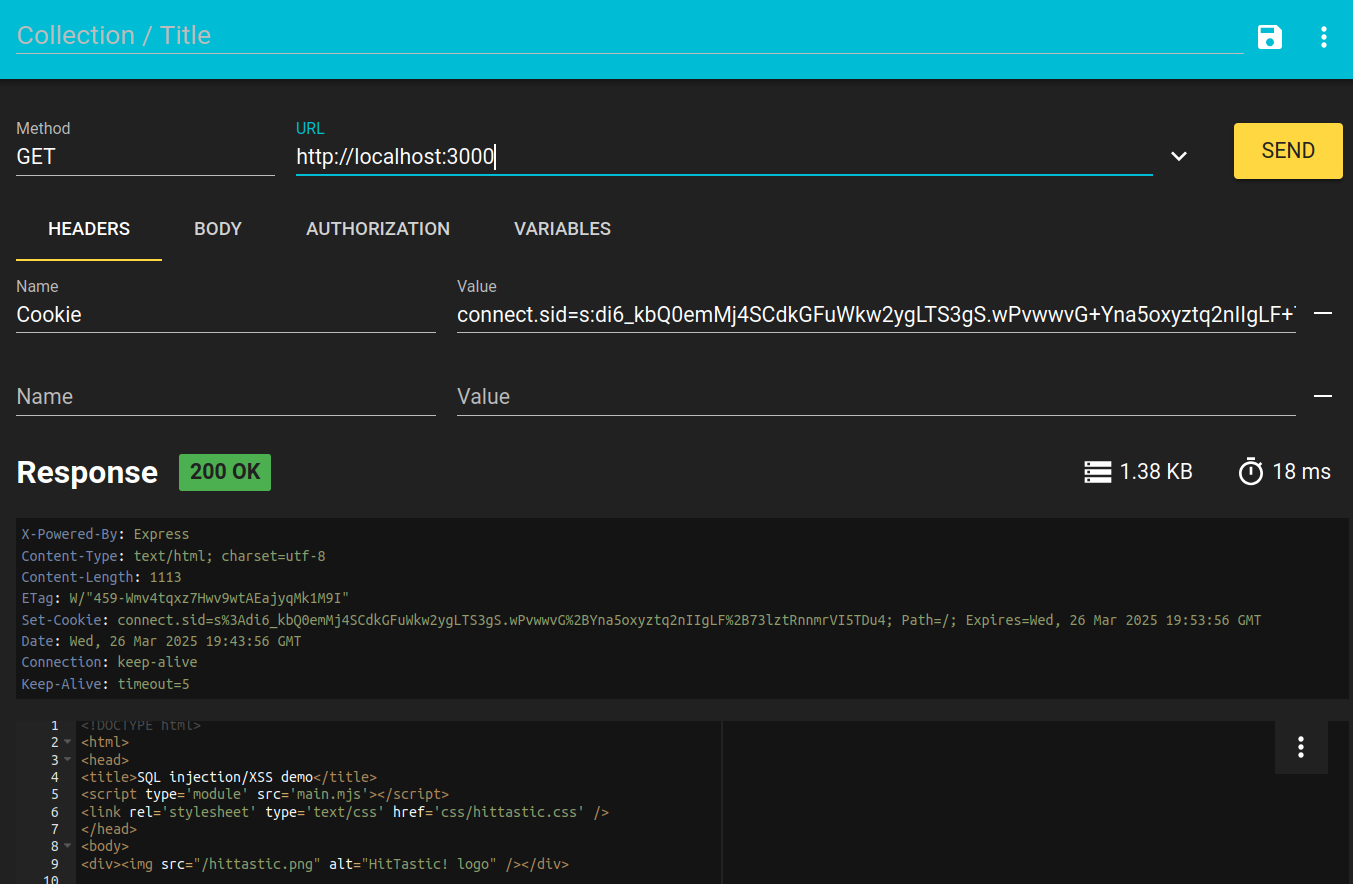
Now switch to another browser, or use Incognito mode in Chrome (as this simulates another browser) - select "New Incognito Window" from the main menu. Your session will not be active here as cookies are browser-specific. Prove this by visiting the HitTastic! main page - you will not be logged in on your second browser. In your second browser, load up RESTer if you are on your own computer and set the Cookie HTTP header as shown below:
If you do not have and cannot install RESTer, use this substitute at http://localhost:3000/stealcookie.html and copy the session cookie in there:
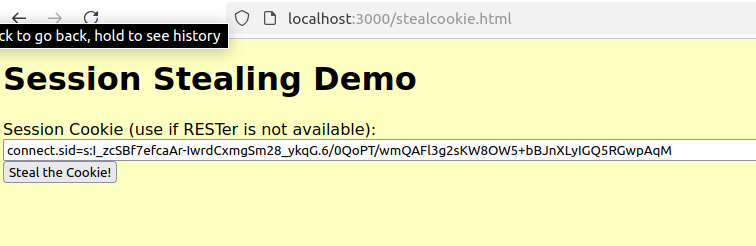
Now access HitTastic! on http://localhost:3000.
Exercise 4
Answer to exercise 4
You have stolen the session revealed through the phishing attack and sent it to the server as a cookie via the Cookie header. The server will use this session ID to identify the user.
Guarding against basic XSS attacks: using the Node xss module
Node makes it easy to guard against XSS attacks using the xss module (install with npm install xss). With this, you can sanitise any input before it's output again. This invoves replacing characters with special meaning to HTML, such as < and > with their HTML entities, such as < and >. The attack relies on the browser receiving HTML tags in the response, so if these are sanitised, the browser will not interpret them as tags and the attack cannot take place. For example:
If the XSS sanitisation had not occurred, then the HTML
would be sent back to the client, and the browser would execute the JavaScript inside the script tags. However with the use of the xss module, the browser receives instead <script>,
and the browser will not interpret <script> as a script tag, so the attack will not take place.
It's also of note that if you use EJS, this sanitisation takes place automatically when you render (without the need for the xss module), as long as you use <%= rather than <%- to render data.
Coding Exercise
Prevent the XSS attacks working using the xss module.
Using regular expressions
Another way of guarding against XSS attacks is to restrict the characters allowed. This can be done through the use of regular expressions. Regular expressions are a special syntax which are used to detect certain patterns in text (e.g. numbers, letters, or a mix of numbers and letters). For example this if statement is checking whether req.params.id matches the regular expression \d+ (se below).
The regular expression itself is the group of characters betwen the slashes /. The regular expression plus the slashes is known as a regular expression literal. This creates a RegExp object which has an exec() method which you can use to check whether a given input matches the regular expression. See the documentation on Mozilla.
The ^\d+$ is a regular expression specifying one or more digits (\d), so if the ID contains anything other than digits it will evaluate to false. The ^ represents the start of the string, and the $, the end of the string.
The exec() method returns null if the regular expression does not match, otherwise an array containing the matched string, the index in the test string where the match occurred, and other properties.
Simple regular expressions
^[123456789]+$
This regular expression will match one or more digits 1 to 9 in an input string
- ^ means the beginning of our text; $ means the end of our text
- + means "one or more of"
- [ and ] define a group of accepted characters
A simpler way of doing the above example is to use - to define a range of allowed characters:
A similar example matches one or more digits or upper or lower-case letters:
and this one will also match underscores:
More simple regular expressions
^\w\w\w\w\w\s\w\w\w\w\w$
- This regular expression will match two five-letter words separated by a single "white space" (space or tab)
- ^ means the beginning of our text; $ means the end of our text
- \w means any letter, number or underscore; \s means any "white space" (space or tab)
^\w{5}\s\w{5}$
- This is shorthand for the above; \w{5} means "match five letters, numbers or tabs"
^\w{4,5}\s\w{4,5}$
- This will match four or five letters, numbers or tabs, separated by a whitespace character.
^\w+\s\w+$
- This regular expression will match two words of any length separated by a single "white space"
- As we have seen, + means "one or more of the preceding element"; i.e. \w+ means "one or more letter, number or underscore"
More on regular expressions
See the documentation for more information on using regular expressions in routes.
Coding Exercise
Look at the password hashing example near the beginning of this week's notes.
Change the /signup and /login routes to use password hashing.
You will need to ensure you add a value of 0 for the balance when adding a new user.
Do not use passwords that you use here even in real life, even though hashing significantly improves security it does not make the login 100% secure.