Topic 6
Further Kotlin Language Features: Lambdas and Interfaces
This week we will look at some further Kotlin language features, in particular lambda functions and interfaces.
More on Functions in Kotlin
In Kotlin, functions can be stored in variables and passed as arguments to other functions. In this respect, Kotlin is similar to JavaScript. This property of functions makes them first class (see the Kotlin documentation).
Anonymous Functions
- An anonymous function is a function with no declared name after the fun keyword
- Anonymous functions can be passed in as arguments to another function, or referred to via variables
Here is a basic example of an anonymous function, referred to by the variable funcReference here:
- Note how we set
funcReferenceequal to a function which has one Int parameter, returns Int and calculates and returns the cube of the number funcReferenceis a reference to this anonymous function- We can use this reference to call the function
- Notice how we can also set up a second reference (
secondRefhere) to the function, and use that to call it
Passing functions as arguments to other functions
- In Kotlin, we can pass functions as arguments to other functions
The parameter type for a function passed into another is:
where
ParamType1,ParamType2,ParamType3etc. are the parameter types for the function being passed in, and returnType is the return type of that function.
This is probably better explained via example, so here is one:
- The corresponding data type of the parameter,
f, is(Int) -> Int, to indicate that the function being passed in takes one Int and returns an Int
If the function being passed in returns nothing, we specify Unit as the return type, e.g:
This time we pass in a function which prints a given number of stars, but does not return anything, hence specifying Unit as the return type of the function passed into execFunction.
Lambda functions
Lambda functions are similar to ordinary anonymous functions but use a special, concise syntax. They are typically used for simple, quick operations such as transforming all members of a dataset in a certain way (e.g. doing a mathematical calculation on a dataset of numbers, or capitalising a dataset of strings).
You may have come across them in Python, or the very similar arrow functions in JavaScript.
Here is the first example rewritten to use a lambda function:
- Note how we write a lambda: we enclose the whole function (the parameters as well as the function body) in braces { }, and separate the parameters and the function body with the -> token
Note how we have to specify the type of the lambda:
This is because we do not specify the parameter types in the lambda, therefore we have to specify the type of the variable holding it
We do not need the
returnkeyword: the lambda will automatically returni*i*i
Note how in our case, the lambda only has one statement (i*i*i), but they can actually have multiple statements, one statement per line; e.g.
The final statement in a lambda is treated as the return value.
See the Kotlin documentation for more details on lambdas.
Making the lambda more concise - the implicit "it"
In cases in which a lambda has just one parameter - a common situation - we can refer to that one parameter implicitly using the keyword it.
Thus, we can rewrite the cube example as follows:
- Because the
itparameter always corresponds to a single argument passed in (3 in this example), and because the value of last statement of a lambda is always returned, it follows that this example will also calculate the cube of the argument passed into the lambda
Real-world use of lambdas
- A very common real-world use of lambdas is to write code in a functional style
- A typical pattern in functional code is to apply a given function to all members of an array, list or map
- This leads to more readable, intuitive code with the details of looping through the collection hidden away
- Collections (lists, maps) have a range of functions (methods) which apply a lamda to some or all members of the collection
The simplest is forEach(), which applies a lambda to all members of a collection:
- Note how the
forEach()method of the list takes a lambda as an argument - The lambda will be applied to all members of
peopleList, with each person in turn being passed into the lambda as thepersonparameter - The result, therefore, will be that each person will be printed
- Note also how we can omit the parentheses () when passing in a lambda as the first argument to a function
Exercise 1
Answer to exercise 1
We could use the implicit it parameter rather than having to declare a named person parameter, i.e.
Other collection functions which use lambdas
- There are a number of other collection functions which can apply a lambda on some or all members of collections, and can be used to perform common tasks concisely using a functional style
- e.g.
filter()- filters a collection by applying a lambda to each member of a collection, and returns the filtered collection. If the lambda returns true for that member, that member will be in the filtered collection.filterNotNull()- filters null values from a collectionmap()- maps the values of a list or array to another list or array by applying a transformation function. The transformed list or array is returned.
- See the Kotlin documentation for a full list.
Other collection functions - example
This example shows some of the functions mentioned on the previous slide:
Note how we can chain these functions together, e.g. filter() followed by forEach() in the first example
Interfaces
The Problem With Inheritance and the Need for Interfaces
Imagine we have a situation where a class could potentially inherit from more than one parent class. For example we could have a Bird could inherit from both Animal and FlyingThing. It could inherit the following methods and attributes from Animal:
eat(),makeNoise()nLegs,nEyes
... and the following from FlyingThing:
fly()nWings
How do we handle this?
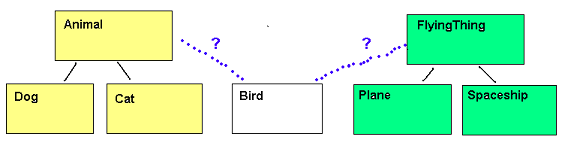
Multiple Inheritance?
- Some languages (e.g. C++) use multiple inheritance
e.g. the equivalent of
- However, multiple inheritance can be difficult to work with in some cases, due to clashes with attributes and methods inherited from multiple superclasses
- Therefore, many languages avoid multiple inheritance in favour of interfaces
Introduction to Interfaces
- An interface is a list of methods which implementing classes must include
- Interfaces allow us to define common actions across different inheritance hierarchies
- Classes in different inheritance hierarchies implement the interface
Interfaces are used to define common behaviour across classes which might be from different inheritance hierarchies. For example, birds might be animals and planes might be vehicles, but they share the common behaviour of flying.
Generally you should follow the principle: if something "fundamentally is" something else, use inheritance. If it just shares common behaviour, use an interface. So for example a Bird is fundamentally an animal, so it makes sense to inherit Bird from Animal. But a Bird isn't fundamentally a "FlyingThing", it just has the behaviour of flying. So it makes sense to make FlyingThing an interface.
Interface Example
- This defines an interface called FlyingThing
- It specifies a method called fly()
- We do not code the method in the interface
- Instead, we code versions of the method in classes which implement the interface
- Each class which implements FlyingThing must include a fly() method
How do we implement an interface
Use the same syntax as for inheritance, e.g.
Because Bird and Plane implement FlyingThing, they must each include a fly() method, e.g:
Interfaces with polymorphism
Because interfaces allow us to define common actions across different classes, we can use them in conjunction with polymorphism. For example:
- We create an list of FlyingThings and initialise the members of the list to different types of FlyingThing
- Because we know that all FlyingThings will implement the fly() method, we can then loop through the array and call the fly() method of each
- ... and each FlyingThing will behave appropriately
Real-world use of interfaces
The above was just a trivial example showing the concept of interfaces. However, how are they used in the real world? The advantage of using interfaces is that you can specify a list of methods which must always be present, without revealing what actual class will be used. As long as the class you use implements the interface and the list of methods stated in the interface, any class can be used where a method parameter is of an interface type. Why is this potentially more useful than inheriting from an abstract superclass which specifies a list of abstract methods?
- It makes our code more flexible as any class which implements the interface can be used. We are not restricted to using classes which inherit from a specified superclass.
- It means we can make changes to our code without potentially having to rewrite your entire inheritance hierarchy. If we use interfaces which provide a list of methods, and you want to change which class implements those methods, you just need to make the new class implement the interface and its methods - no need to perform a major design revision to rewrite your inheritance hierarchy.
It's probably best to illustrate real-world interface usage with an actual example. A common use of interfaces is to implement user event handling in a GUI application. Events occur when the user interacts with the UI, for example by clicking a button. We respond to events with event handlers - functions and methods which run when the event occurs. Typical event-handling code might look something like the example below (this is not the real code you would use in Kotlin GUI programming, it's just an example to illustrate the point). Here we are adding an event handler object (clickHandler) to a button:
The addClickHandler() method of the Button class might have the signature below, i.e. it takes one parameter of type ClickHandler:
fun addClickHandler(clickHandler: ClickHandler)
Here, ClickHandler could be an interface which might specify one method, onClick(), for example:
The advantage of this design over making ClickHandler an abstract superclass is that any class can implement the ClickHandler interface and provide an onClick() method to handle the user clicking on the button - including classes which already inherit from something else. If we created a ClickHandler class instead, the onClick() method would have to be placed inside a class inheriting from ClickHandler which makes the code less flexible as some of our classes might already be subclasses of another superclass. By defining an interface instead, it means that any object we like can act as the ClickHandler, provided it implements the ClickHandler interface and has an onClick() method.
This also allows us to make changes to our implementation more easily. If we want to change the class which handles our click events, we can easily do it by making the new class implement the interface and adding an onClick() method to it.
Later on in the module we will see how interfaces are often used in design patterns.
Anonymous classes
You can create objects which implement an interface on-the-fly without having to create a new named class by using an anonymous class. An anonymous class is an unnamed, single-instance class which typically inherits from an abstract class or (as here) implements an interface, and provides implementations of the required methods on-the-fly, and is specified using the syntax object: InterfaceName (literally, an object which implements the interface InterfaceName).
Looking at the code which creates the anonymous class in more detail:
This means that the variable eventHandler is an object of the anonymous class. The type of eventHandler is object: ClickHandler, i.e an object which implements the ClickHandler interface. Note how it includes an implementation of onClick(), as required by the interface.
Single Abstract Method (SAM) conversions
The above example works, but you could argue that creating the anonymous class with an implementation of onClick() is quite wordy and long-winded.
What Kotlin allows us to do instead, in cases where an interface only specifies a single method, is to specify the anonymous class using a lambda representing the interface's method. This technique is known as SAM (Single Abstract Method) Conversions.
So in this example we could rewrite our setupGui() as follows:
Note how the anonymous class, with its onClick() method, is no longer present. Instead the argument to addClickHandler() is now a ClickHandler object with a lambda as an argument. This lambda is the Single Abstract Method implementation, i.e. the implementation for the onClick() for our button.
For this to work you need to change your interface to be a functional interface. To do this, you just precede the keyword interface with the keyword fun:
Exercises
Coding Exercise 1 - Git Merging
Moved from Week 5 due to insufficient available time.
Make a fork of the version of the cat project at https://github.com/nwcourses/CatApp-week5.
- Clone your fork.
- Create a new branch called
devand switch to it. - On the
devbranch, modify theCat'swalk()method so that it takes a parameterdistancerepresenting the distance the cat will walk. Adjust theifstatement and the subtraction operation to take account of the distance. There is a bug in the code. Leave the bug in there - do not try to correct it. - Commit the change.
Now checkout your
mainbranch, e.g:- In the
mainbranch, you are going to fix the bug present inwalk(). Thewalk()method should only reduce the weight of the cat if the weight, after walking, is 5 or more. Hopefully you can find the bug, if not, ask. - Commit the change with a comment such as
bugfix in walk(). Now try to merge the change in the
devbranch (i.e. the addition of thedistanceparameter) intomain. You will find it fails, with a message such as:What has happened here is a conflict. The
mainbranch and thedevbranch have updatedwalk()independently, and Git does not know which version to use for the merge. If you now look atCat.kt, you will see something like this:This syntax shows the two versions of code from the two branches. The
=======divides it into the code from the current branch (mainhere), and the other branch (devhere). Theindicates the start of the code from the current branch (
HEADis a pointer to the current branch), and theindicates the end of the code from the other branch - note how the name of the branch,
dev, follows the arrows- What you have to do now is resolve the conflict.
- Look at the section between the
<<<<<<<and>>>>>>>. This represents the part of the code containing the conflict, with themainbranch above the=======divider and thedevbranch below. - Pick the code you want to include in the merge. This will be the code from the
devbranch, but with the bugfix applied. So you will need to delete the code section taken from the main branch (i.e. between the<<<<<<<and the=======divider), and edit the code section from thedevbranch - i.e. between the=======divider and the>>>>>>>end marker - to apply the bugfix you made earlier to the enhanced version ofwalk()indev. - You will then also need to delete the merge conflict syntax (i.e. the left arrows, the divider, and the right arrows). Once you've done this, commit the result as the original error message asked you to do.
- Look at the section between the
- You have now successfully performed a merge and resolved a conflict!
Coding Exercise 2 - Interfaces
At https://github.com/nwcourses/com534-topic6-music is the starting point for a simple vinyl music management application. You will note that there are three classes present:
Song: a simple data class representing a song, containing attributes for title, artist and playing time.Single: representing a single. A single is typically a 7-inch vinyl record with two sides, and a different song on both sides (the A-side and B-side). The A-side is usually the well-known song. Before the advent of digital music, the pop charts represented sales of singles.Album: representing an album. As you should be aware a vinyl album (size 12-inch) contains many tracks, typically 10-12 (though this can vary), with about half on the A-side and half on the B-side.
- First, add a method to the
Albumclass to return only songs by a particular artist on the album. (As you probably know, multi-artist compilation albums exist, e.g. "Best of Rock", "Best of Dance", "Best of the 80s", etc). It should take an artist as a parameter, and usefilter()to filter the list of songs and return the filtered list, i.e. songs by that specific artist. The main task in the exercise is to create an interface called
Musicwhich represents a piece of music (either single or album). It should contain two methods:getPlayingTime()which returns the total playing time of the music in seconds as aDouble.getAllSongs()which returns a list of all the songs on that piece of music as aList<Song>.
Add code to
SingleandAlbumto make them implement theMusicinterface. Implement the methods as follows:- In
Single,getPlayingTime()should return the playing time of the A-side plus the playing time of the B-side.getAllSongs()should return a list containing the A-side and B-side. - In
Album,getPlayingTime()should return the playing time of all the songs on the album added together.getAllSongs()should simply return the list of all songs on the album.
Test out your system in
main()by adding theSingles andAlbums to a list, and writing code (usingforEach()) to calling the two interface methods on each item ofMusicin the list.Now implement a
RecordPlayerclass. This represents a record player. This should contain just one method: aplay()method which takes aMusicobject as a parameter, calls itsgetPlayingTime()andgetAllSongs()methods, and prints all the details. (In the real world this would actually play the music, but obviously we can't do that here!)- How does this last question illustrate polymorphism?
Test out your
RecordPlayerin themain()by calling itsplay()method with each single and album.
Coding Exercise 3 (more advanced; optional)
This is a more advanced exercise on interfaces which illustrates their real-world use in user interface handling.
At https://github.com/nwcourses/com534-topic6-university is another version of the University project. You are going to simulate event handling by using an event handler interface called MenuHandler which handles the "event" of the user selecting a menu option.
- Note how the
TuiApplicationclass (which represents the application as a whole, and is created frommain) is implementing theMenuHandlerinterface, so it can act as the handler for each menu item. - Secondly write, inside
TuiApplication, theonMenuItemSelected()method to handle the user selecting a particular menu option. This receives a parameter of the number of the menu item being selected, so you should use awhenstatement to test the number and run the appropriate code. The three items of functionality (add a student, search by ID, search by course) are provided in the code already, but you need to link them to theonMenuItemSelected(). - Using anonymous classes, change your code to write three separate handler objects for each menu item in separate anonymous class objects, as shown in the notes. Each handler object should, inside its
onMenuItemSelected(), include the appropriate functionality (add a student, search by ID, search by course). It can now ignore thechoiceparameter (why?) - Finally change your code again to use a lambda, with SAM conversions, for each event handler.