Topic 8
Binary Search
Introduction
In this topic we will continue with our look at algorithms by looking at how we can perform efficient searches with the binary search.
Efficient searching - avoiding brute-force algorithms
As we saw last time, a basic linear search through a list is an O(n) operation, as the worst-case scenario performance will be linearly proportional to the length of the list. We have to loop through each member of the list until we find the item that we are looking for, which, if near the end of the list, may take some time.
This approach is known as brute-force. Brute-force algorithms attempt to find an answer through testing every possibility (here, every item in the list) and do not try to use any optimisations or more efficient techniques. Another example of a brute-force algorithm would be trying to find the factors of a number (factors of a number are every integer that the number can be divided by to give a further integer, for example the factors of 24 are 2, 3, 4, 6, 8 and 12). What we could do in a brute-force algorithm is to divide the number by every integer from 2 to the number to see if we get an integer as a result. This works, but is not efficient (O(n) with respect to the number).
Another perhaps notorious brute-force technique is one which, sadly, has been proven successful despite the time taken, and that is brute-force password attacks. In this, every possible password of a certain length is tested on a login system. The result will be that the password will eventually discovered. Brute-force password attacks are now feasible due to increased computing power, notably brute-force dictionary attacks (in which known words are tested) which is the reason why longer and more obscure passwords - with special characters, lower- and upper-case letters, and numbers - are now recommended compared to say 20 years ago.
Binary search
Binary search is a significantly more efficient approach to searching than ordinary brute-force search (called linear search). It has O(log n) complexity, which as we saw last week, will mean it performs much better with large sets of data than an O(n) algorithm.
How does binary search work? It works by repeatedly "guessing" a position to index in a list to find a particular item of data. This is described in more detail below, but one point that needs to be made clear is that the data should be sorted - using a sorting algorithm - first. You might be asking yourself, wouldn't that make binary search not particularly efficient compared to linear search, as we have to sort first? The answer is - not necessarily. In many use-cases, such as, for example, searching for a record in a large list of people in some sort of records system (such as a student records system) it's likely that searching will have to be done many, many times. By contrast, the data would only have to be sorted once - i.e. when the data is first created - or at worst, when a new record is added to the data, which is likely to be infrequent.
Binary search is known as a divide and conquer algorithm because the data we are searching is repeatedly divided in order to efficiently find what we are looking for. This is how you would play a "guess the number" game. Someone would try to repeatedly guess a number, and the other person would say "lower" or "higher". The person guessing would then use the other person's response to narrow down the range of numbers they select from.
Here is an example of binary search. We have an array with 100 members containing names sorted in alphabetical order, and we are searching for "Smith, Tim".
- First we select the midpoint of the list. This could be the member with index 49 or 50 (doesn't matter which) for an 100-member list. If we use, in Python:
where start is the start of the portion of the list we are searching (0 - as we are searching the whole list) and end is the end of the portion of the list (99 here, assuming a list of 100) then it will always give a suitable midpoint to index. Note that math.floor takes a floating-point number and rounds it down. If the length is an even number (e.g. 100) it will give us the index of the item immediately before the midpoint (49) while if it is an odd number (e.g. 101) it will give us the exact midpoint (because indices start from 0 and math.floor(101/2) is math.floor(50.5) which is 50, in other words, exactly halfway between 0 and 100.
- You then see what value is at the midpoint. If it's after the search term, you know that you need to look at the portion of the list before the midpoint (i.e. 0-48) while if it is before the midpoint, you know that you need to look at the portion after the midpoint (i.e. 50-99). If the midpoint contains the value you're looking for, of course, you stop as the search has completed.
So, say we find "Jones, Jane" at position 49 in our example. We know we need to look within the range 50-99 because "Smith, Tim" is after "Jones, Jane" in the alphabet.
So we repeat the divide-and-conquer operation. We find the midpoint of 50 and 99 (74) and look at the value there. It's "Nodd, Neil".
We repeat the process. "Smith, Tim" is after "Nodd, Neil" in the alphabet so we know we have to search the portion of the list after 74. So we find the midpoint of 75 and 99, which is 87. We might get "Trott, Tina" at this position, so now we need to look at the portion before 87 (as "Smith, Tim" is before "Trott, Tina" in the alphabet). So we have to search within the portion75-86. We choose the midpoint, 80, and now found "Raven, Roger".
Our area of search is cut down now to 81-86. We pick 83 and find "Smith, Alice", i.e just before "Smith, Tim" alphabetically. We then only have three list positions to search - 84 to 86. So we pick the midpoint 85. We find "Smith, Simon". We now only have one possibility - 86 - and looking at item 86 we finally find what we want, "Smith, Tim".
The diagram below shows the process. Our search term (Smith, Tim) is shown using a red circle.
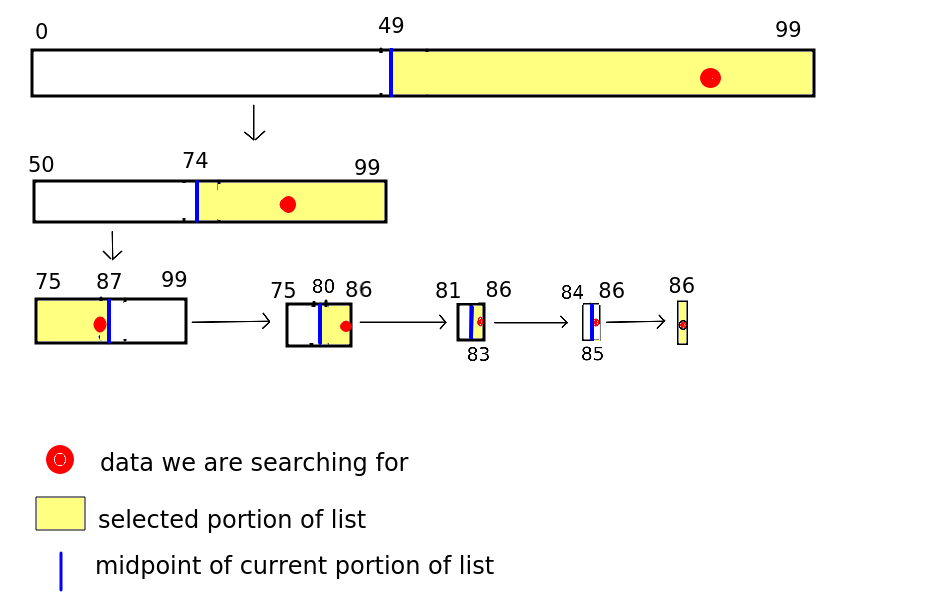
So how many searches did we need until we found Smith, Tim?
- The first search, picking index 49 in the whole list gave "Jones, Jane"
- The second search, picking index 74, gave us "Nodd, Neil"
- The third search, picking index 87, gave us "Trott, Tina".
- The fourth search, picking index 80, gave us "Raven, Roger"
- The fifth search, picking index 83, gave us "Smith, Alice"
- The sixth search, picking index 85, gave us "Smith, Simon"
- … and in the seventh search, we eliminated the possibilites down to one index - 86 - and found what we were looking for, "Smith, Tim".
Clearly 7 checked items (and this was a worst case scenario here, as we only found what we were looking for after narrowing down the possibilities to one) is a good deal more efficient than the 87 we would have to check with a brute-force linear search!
Why is the complexity of binary search O(log n)?
The complexity of binary search is O(log n), with n the number of items in the list. In our example n was 100. What is log(2) 100? The exact value does not matter, but we know it will be between 6 and 7, as log(2) 64 is 6 and log(2) 128 is 7. So you can see that O(log n) fairly represents the complexity, as, in this worst-case scenario, we had 7 iterations.
How can we prove this? Think of a list with an exact power of 2 length, such as 64, and imagine it's a worst-case scenario, where we have to narrow down to one possibility before we find what we are looking for.
- In the first iteration, we take the midpoint of 64 items and split the list into two portions of length 31 and 32 (rejecting the midpoint as it doesn't contain our search item)
- In the second iteration, we assume we search the longer portion of length 32, and split it into two portions of length 15 and 16 (again rejecting the midpoint)
- In the third iteration, we assume we search the portion of length 16, splitting it into portions of length 7 and 8;
- In the fourth iteration, we assume we search the portion of length 8, splitting it into portions of length 3 and 4;
- In the fifth iteration, we assume we search the portion of length 4, splitting it into portions of length 1 and 2,
- In the sixth iteration, we have two values. We assume we pick the "wrong" one.
- So in the seventh iteration, we only have one possibility left and we finally find what we are looking for, or conclude that it is not in the list.
So the length of the portion under search decreases from 64-32-16-8-4-2-1 in each iteration of the list. In other words, assuming the list length is an exact power of two, the number of iterations will be log n + 1 (+1 because we also check a list of length 1 as well as the various powers of two; the lengths in each subsequent iteration are 2^6, 2^5, 2^4, 2^3, 2^2, 2^1 and 2^0 - i.e. 1). But as we saw last week, we only need to take the most significant term of the complexity and can discard the +1 (as we are interested in the general behaviour of algorithms at large n, not the exact complexity) - giving us O(log n).
Likewise, for a value n between 2^p and 2^(p+1), the number of iterations will be p-1, or log(floor(n))-1 - but again we can simplify to O(log n). (For example, try repeating the above on a list of length 63, a value between 32 and 64, and you find that only six iterations are needed, as the length of the portion being searched will decrease 63-31-15-7-3-1).
Exercise 1
Answer to exercise 1
The algorithm would obviously need the data itself within a list, and would also need the
startandendindices of the current section of the list we are working with.The algorithm would end when the
startindex is equal to theendindex. When this occurs, we only have one possible position to check, so if it is equal to the search term, we return the value at that position. Otherwise, we could returnNoneto indicate that the binary search failed to find what we were looking for.
In fact, in some cases end might be less than start.
Let's say we've narrowed down the algorithm to positions 85 and 86 and we pick 85, and it gave us "Smith, Walter", not "Smith, Simon". We have a sub-section of two indices but we know by process of elimination that "Smith, Tim" would not be in the list because "Smith, Walter" is after "Smith, Tim" alphabetically. But how could we test this?
Coding Exercise
Implement binary search in Python. If you are struggling, try working the algorithm out on paper first.