Topic 6
Hash Tables
What is a hash table?
A hash table allows us to look up values efficiently using non-numerical indices or keys. For example, we might want to implement a dictionary in which the words are the keys and the descriptions, the values. Or we might want to implement an address book in which the names are the keys and the addresses, the values. Another example would be a student records system in which the student ID is the key and the full student record is the value.
Exercise 1
Answer to exercise 1
This is inefficient. To search for an item by key, we'd have to use a loop (e.g. while or for) to search the array and compare the key of each item with the key we're searching for. If there are say 10000 items in the array this would be slow as we'd have to potentially look through 10000 items.
We can do better than this, though, and implement lookups by key more efficiently using a hash table.
What is a hash table?
A hash table is an efficient data structure in which the keys (indices) are converted to a numerical hash code using a mathematical function of some kind. This hash code is then used to look up the item in an underlying array. The hash code will be used as the array's index.
An example
It's probably best to start with a very simple example. A simple hash function might simply add the ASCII codes of the characters making up the key (use the ord() function to obtain the ASCII code of a character). We might use it in a dictionary program storing words as the keys and their meanings as the values. So we could have these words, where the word is the key and the definition is the value.
| Word (key) | Definition (value) |
|---|---|
| cat | Small feline often kept as a domestic animal |
| dog | Canine closely related to the wolf, often kept as a domestic animal |
| rat | Small furry animal which squeaks |
| act | To perform on stage, or to do something |
If we calculated the hash codes of the first three keys we would get:
- "cat" - summing the ASCII codes gives 99+97+116 = 312
- "dog" - we get 100 + 111 + 103 = 314
- "rat" - we get 114 + 97 + 116 = 327
The hash code returned from the hash function can then be used as the array index to add the data to. So, we'd place a two-member list containing the key/value pair "cat" and "Small feline often kept as a domestic animal" at index 312 in the underlying array. Similarly, we'd place the "dog" entry at index 314 and "rat" at index 327.
Exercise 2
Answer to exercise 2
If we try to add an entry containing the key "act" we have a problem. The hash function for "act" would be 97+99+116 which equals 312. 312 has already been used for "cat"; you probably should be able to see that "act" is an anagram of "cat" and will thus have the same hash code. Thus we have a clash, because two key/value pairs would be placed in position 312. There are two common solutions to clashes, separate chaining and linear probing.
Dealing with clashes
Separate chaining
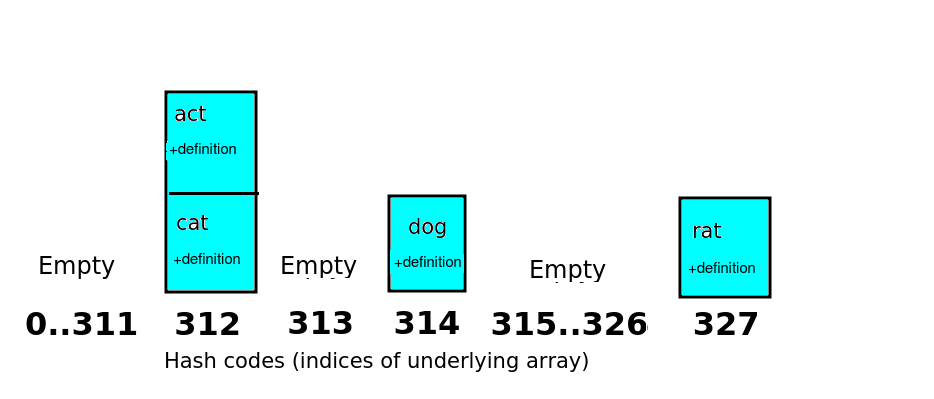
With separate chaining, the underlying array is an array of "buckets". Each item with a given hash code is placed into the bucket for that hash code, so one bucket might have more than one item. In this example, "cat" and "act" would be placed in the same bucket, as they have the same hash code. Each bucket would contain a list of items.
This is shown in the diagram below.
Linear probing
Linear probing is an alternative approach. With linear probing, each array index contains only one item, not a list. If there is a clash with hash codes, the item is moved on to the next available place in the array. So, in the above example, both "cat" and "act" would have a hash code of 312. As "act" is the second item to be added, it would be moved to the next available index after 312, which is 313. This is shown in the diagram below.
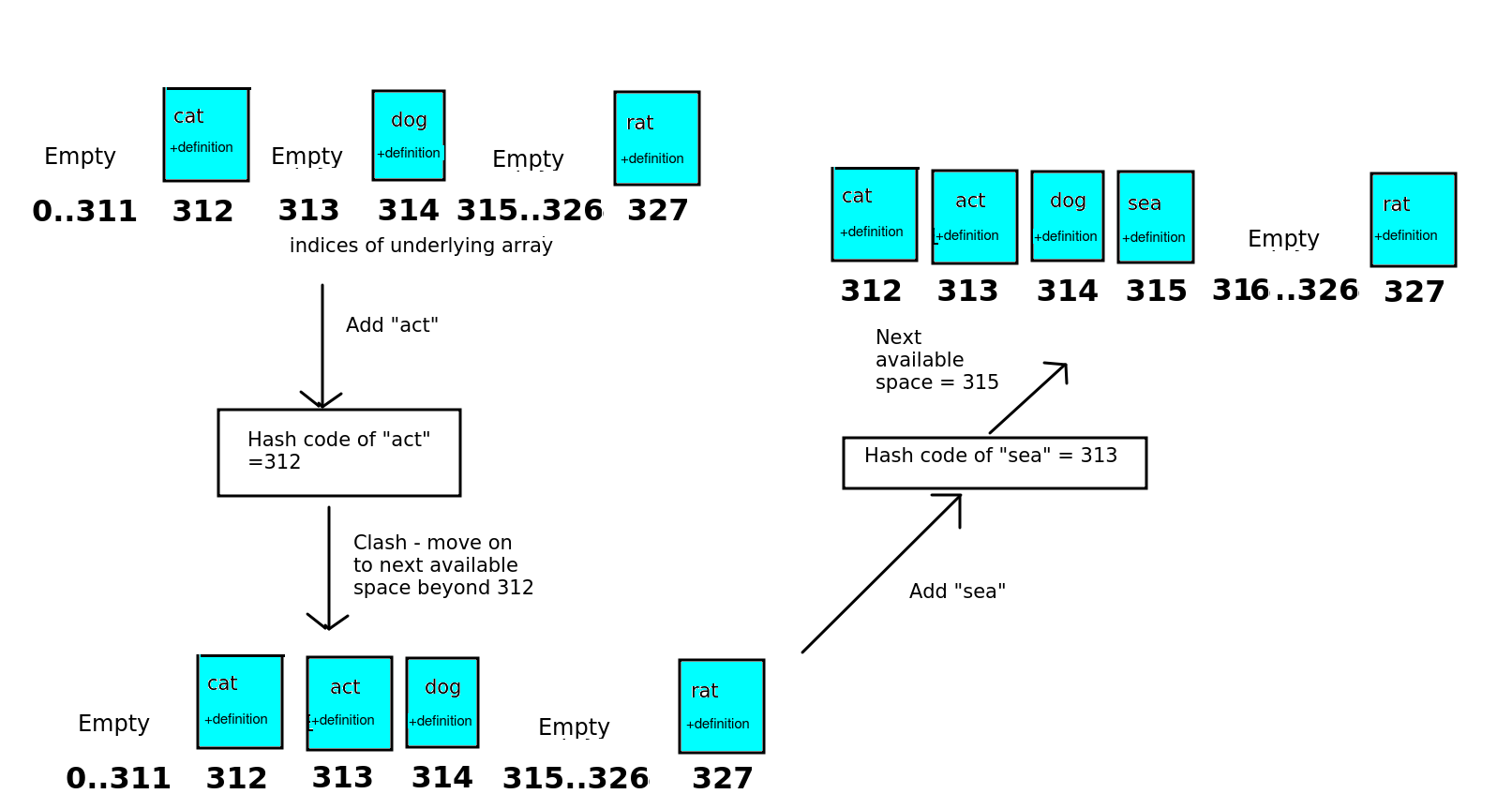
The diagram also shows a second clash and how it's resolved with linear probing. We try to add "sea". The hash code of "sea" is 313. However, all indices between 312 and 314 inclusive have been used up by this point, with "cat", "act" and "dog" respectively. So we have to move "sea" on two places from its hash code, and add it to position 315 in the array.
Linear probing can lead to clusters if several keys have the same or similar hash code, i.e. entries get placed in adjacent buckets. This makes it less efficient to search if we are looking up the entry using the key, because we have to move on several places along the array until we find the key we want. However, separate chaining also has a time efficiency issue, as we have to search through a list if there are clashes. (Opinions differ on which is actually the most efficient)
Better hash functions
The extremely simple hash function above, which simply adds the ASCII codes of the characters making up the string, leads to a high probability of clashes. So for this reason we must pick a hash function which ensures clashes have a low probability of occurring – these typically perform a more complex operation on the characters of the key.
When dealing with hash functions which produce a hash code for a string, a typical approach is to multiply a numeric code for each character in turn by a successive power of some factor f and sum the values together to arrive at the final hash code. To minimise clashes this should be a fairly large number; for example the Java language standard library uses 31. So, the first character's ASCII code is multiplied by f^0 (1), the second character's code multiplied by f^1(f), the third character's code is multiplied by f^2(f squared) and so on.
So the equation for this, where f is the chosen factor, s is the string, and n is the length of the string, would be:
This is easy to implement with a loop, as we can just loop from 0 up to the length of the string and add all the values together to give the hash code.
(For what it's worth, the Java language does this in reverse, in other words uses f^(n-1) for the first character and f^0 (i.e. 1) for the last, but the same concept applies; Oracle )
If we run through this with "cat", we get :
For "act" we end up with:
You can see that the clash no longer happens automatically with keys which are anagrams.
Using this approach, while minimising clashes, will lead to large numbers as hash codes. A small word like "cat" has a large hash code of 114582.
For longer words, the hash code is going to be an even bigger number. This is clearly inefficient as, if we adopt the approach above without taking any further steps, our underlying array is going to need 114582 spaces (buckets) to even be capable of storing a very short key like 'cat' !
So, we typically decide on a much smaller number of buckets and then perform a modulo (remainder) operation to calculate which bucket the data should be placed in. We decide how large our underlying array is likely to be (which will depend on our particular use-case, but should be larger than the likely number of items in the hash table) and divide the hash code by the modulo (%) of that number.
There is a trade-off in deciding the number of buckets: over-large bucket arrays will waste memory, but over-small arrays will lead to many clashes which means lookup will be slower as we will have to search through longer lists (assuming separate chaining) at each position or have to deal with more clusters (assuming linear probing). To minimise clashes, you should try and ensure your array is larger than the likely number of entries in your hash table.
The chosen size should be prime (why this is, is explained below). So imagine we had a likely maximum size of 100 entries, we could find a prime number rather larger than 100, for instance 127. So in the above case, the array index (or bucket number) for 'cat' would be:
so, 'cat' would be added to bucket 28 (where buckets are numbered from 0-126, i.e. 127 buckets - the underlying array has a capacity of 127).
The chosen size should also be different to the factor used when calculating the hash code, as otherwise the chance of clashing will be greater. Because 31 is used as the factor when calculating the hash code, there is a fair chance that many of the keys will end up with the same modulo 31 if the keys are related (Question 10 in the coding exercise will explore this), so using 31 as the bucket size will result in some buckets containing many members and others being empty.
Why use a prime number for the number of buckets?
As well as ensuring that the number of buckets is different to the factor when calculating the hash code, it is recommended by many to use a prime number for the number of buckets. Why is this?
This is discussed here. If our hash codes are truly random, there is no reason to use a prime bucket size. However they may be related. As discussed in the link above, memory addresses are often multiples of 4, due to the way data is stored in memory. So if we want to calculate a hash code for a variable based on its memory address, all our hash codes will end up being multiples of 4. So using a multiple of 4 for the array size (number of buckets) will be a poor choice as clashes are very likely. All the buckets which are multiples of 4 will fill up, while all the other buckets will remain empty. This can be generalised: if the hash codes end up being multiples of some number n, then choosing a hash code which is also n or a multiple of n will end up with more clashes than expected by chance. So a prime number where an enhanced likelihood of clashes will only occur if the hash codes are all multiples of that prime number (unlikely), should be chosen.
Even if the data in your hash codes will not be related in any way, it's good practice to get into as it allows your hash table to be used for data which is related, making it more reusable.
Implementation details
Having looked at the basic workings of a hash table, how would we actually implement it? A Hashtable class would have two key methods:
put(key, value), which adds a key/value pair to the hash table.get(key), which looks up an item in the hash table using its key. It should return the corresponding value.
put() is quite easy. (The first thing we have to do is convert the key to a hash code using a hash function. We'd then need to add the key and value to the appropriate 'bucket' in the array, using the hash code as its index. Each 'bucket' holds a list (a linked list is generally recommended as it's efficient to add to the end of the linked list), so you need to append the key and value to this list. The most efficient way of doing this in Python is with a tuple, so we'd create a tuple containing the key and value, and add this tuple to the linked list).
Exercise 3
Answer to exercise 3
We might have several entries in the same bucket. If we only stored the values in the bucket, and not key/value pairs, we would be unable to identify which item in the bucket corresponds to our key. If however, we store the key as well, we can compare the key of each entry in the bucket with our search key.
So, when retrieving the data with get(), we have to convert the key to the hash code, find the bucket with the index corresponding to the hash code, and then search through the list within this bucket to find the entry corresponding to the key.
Advanced: Secondary hash function
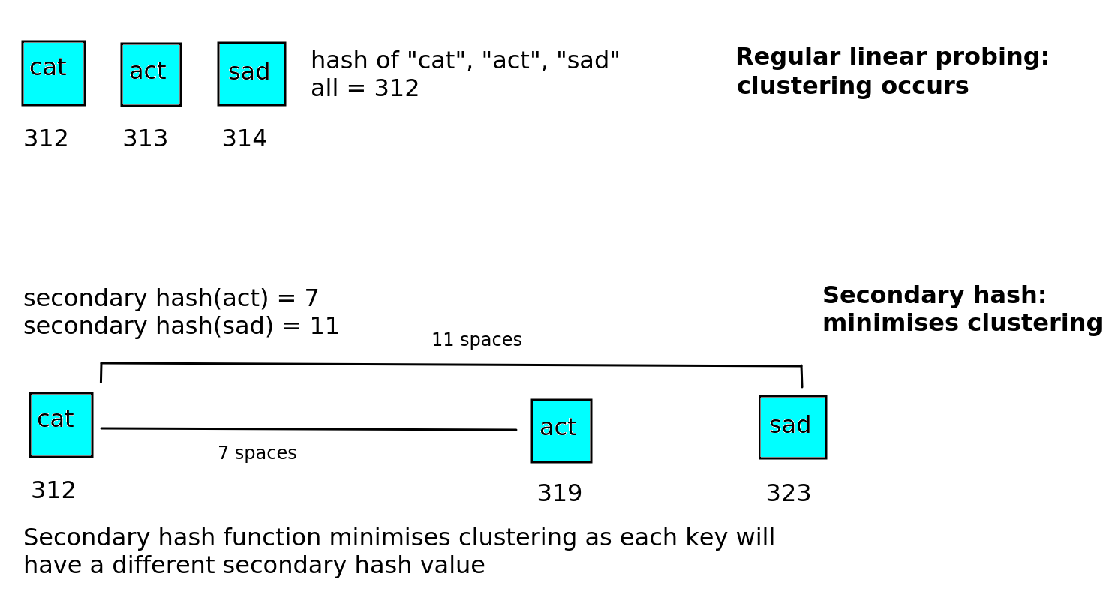
To minimise clusters in linear probing, we can use a secondary hash function to calculate the displacement, and increase that number of places in the array in the case of a clash.
For example, if the secondary hash function gives 7 for "act", we'd place "act" at 312+7 = 319, rather than 313. This is shown on the diagram below:
Secondary hash functions typically involve a modulo calculation for example:
where N is some prime number (the reason for favouring prime numbers in hash tables is discussed above). The secondary hash function must be different to the primary hash, in other words two keys with the same primary hash value must have different secondary hash values so that the number of indices to move on is different for both cases. If they do not, the clustering problem will still occur as each item of data will be moved on the same number of places within the array.
Paper Exercise
- Draw the 17-item hash table (array of 17 'buckets') that results from using the hash function:
where k is the (numeric) key, to hash the keys of the following students which might be stored in a hash table with the student ID as the key and the name as the value:
| Key (Student ID) | Value (Name) |
|---|---|
| 36 | Andrea |
| 88 | Barry |
| 54 | Chantal |
| 28 | Dexter |
| 49 | Erin |
| 21 | Fernand |
| 63 | Gabrielle |
| 7 | Humberto |
| 19 | Imelda |
| 2 | Jerry |
| 11 | Karen |
| 41 | Lorenzo |
Assume collisions are handled by separate chaining.
Just calculate the hash code of each key using the equation above. This is a simpler case than the example on the notes, which involved string rather than numeric keys.
You can use a simple Python program to do this, e.g.
- Repeat question 1, but assume that collisions are handled by linear probing.
Coding Exercise
(Questions 1-9 are the most important questions to finish. The later questions are more advanced and designed for those of you coping well with the module so far).
On GitHub, fork this repository:
This repository contains some starter code to implement a linked list, to be used for separate chaining in your hash table.
- Clone your fork (you can get the fork from VCS within PyCharm).
- Modify the linked list as directed by the comments:
- The
add()method should be changed to take a key and a value (corresponding to the keys and values used by the hash table) as parameters, and should create a tuple using them. A node should then be created using the tuple as its data, and added to the linked list. - Also change the
find()method so that it assumes thesearchInputis a key. Where the code compares thesearchTnputwith the current value (line 37 in the original code), modify it so that it compares the key against the first member of the tuple stored in the node (i.e. the key). Return the second member of the tuple, i.e. the value.
- The
- Implement a
HashTableclass using separate chaining. The keys should be strings and the hash function should be simply the sum of the ASCII codes (this is a poor hash function, as we have seen, but it's to keep things simple to begin with). You can useord()to calculate the ASCII code of a character. The hash function should be a method of the hash table class, taking the key as a parameter and returning the hash code. Use an underlying list with size 17 (i.e. 17 buckets), take the modulo 17 of the hash code, and use the linked list above to store the list of items in each bucket. Initialise the underlying list to be an list of 17 linked lists:
This expression is known as a list comprehension and is a quick way of filling a list with values. Basically it creates a new
TuplesLinkedList()for every integer value from 0 to 16, i.e. 17 linked lists in total, and places them in the listself.buckets.- Implement a
put()method in your hash table class. This should take a key and a value as parameters, calculate the hash code of the key, then calculate the modulo 17 of the hash code to find the bucket to add the data to. Use the linked list'sadd()method to add the key and value to the linked list for that bucket as a tuple. - Implement the
get()method in your hash table class, to find an item by key. This should calculate the hash code of the key, find the bucket, and then use the linked list'sfind()method to find the appropriate entry. - Test the hash table by
putting a few keys and values into it and thengetting them back. Try to choose at least two keys which will clash. - Enhance your hash table by using the "powers-of-31" approach (described above) to calculate the hash code. You should still use modulo 17 to calculate which bucket to place the value into. Note that the "power" operator in Python is
**. - This question allows you to explore why it is not a good idea to use the same bucket size as the factor used in the hash function. Change your hash table to use 31 rather than 17 buckets and try adding the following data to the hash table:
| Student ID | Name |
|---|---|
| Q10201 | Andrea |
| Q12321 | Barry |
| Q14442 | Chantal |
| Q25343 | Dexter |
| Q34531 | Erin |
| Q09878 | Fernand |
| Q11333 | Gabrielle |
| Q22224 | Humberto |
| Q11144 | Imelda |
| Q54555 | Jerry |
| Q25856 | Karen |
| Q43334 | Lorenzo |
What happens with the buckets in your hash table when you use 31 buckets? Why?
Go back to using 17 for the number of buckets. Copy your answer to questions 1-9 into a new Pycharm project, and change it to use linear probing rather than separate chaining. Move forward one space if there is a clash.
Advanced: Enhance your linear probing-based hash table to use a secondary hash function to calculate how many spaces to move on when searching for a free space. It should be:
where hash_code is the primary hash, i.e. the hash code calculated from the "powers-of-31" approach above.