Topic 3
Introduction to Object Oriented Programming
Introduction
From next week onwards we will move on to actually implementing some data structures in Python, starting with the stack and the linked list. However, in order to do this effectively and cleanly, you need to be familiar with object-oriented programming. You will be introduced to this topic in more depth in COM411 later, but I will introduce this week just enough object-oriented programming for you to be able to code your own data structures.
(Note that Python comes with an extensive range of built-in data structures, for example you can treat the standard list type as a stack and perform push and pop operations, but we are going to build them from scratch, in order to gain a deeper understanding of how the various data structures work.)
What is object-oriented programming? - A very quick summary
Object-oriented programming involves developing code by thinking about all the real-world entities that your program needs to handle (such as students, employees, or data structures such as linked lists and stacks) and writing code to represent each real-world entity. To do this, we need to create classes and objects.
Classes and Objects
See the Python documentation for classes and objects.
What is a class?
(This is a simplified explanation. More depth will be provided in COM411.)
A class can be thought of as a complex data type. Classes provide a way to define our own custom data structures. For example, we could create a Cat class to represent a cat, a Stack class to represent a stack, or a Student class to represent a student. Classes represent specific types of real-world entity, such as cats, stacks or students, and can be considered as a blueprint which define how that type of entity works.
What is an object?
An object is a specific instance of a class, for example, a specific cat, stack or student. A class can be thought of as a blueprint, or specification, for how a particular data structure should work. However an object is a specific example of that data structure.
For example, each of the two cats in the photo below (Binnie and Clyde) could be represented in code with an object. One object for Binnie, and another for Clyde.
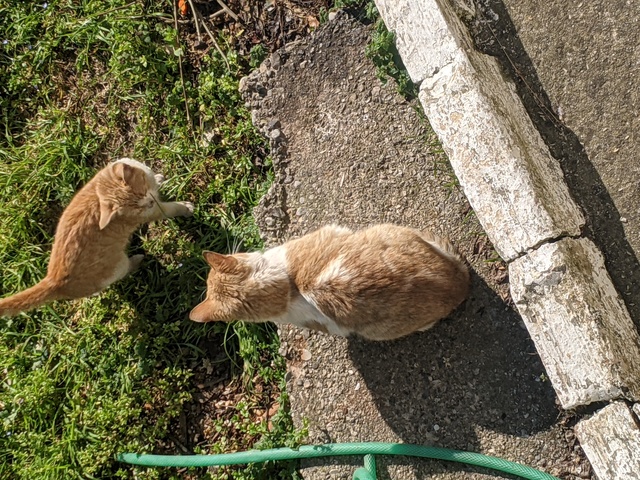
We could define a Cat class and then create many cat objects, reperesenting individual cats.
We could define a Stack class, and then create two Stack objects. One Stack object could be used in a web browser and contain your browsing history, whereas another could be used in a paint program and represent each drawing operation you do, allowing you to undo them.
Or, you could define a LinkedList class, and then have one LinkedList object to store students at a university, another to store courses, and yet another to store staff.
Exercise 1
Answer to exercise 1
To answer the question, you need to consider which of these are a general type of real-world entity and which are a specific real-world entity. Using this guidance we find that:
- The following are classes: Popstar, Tree, Dog, City, Programming language, and Python (the type of snake). All of these are a general type, or class, of real-world entity, not a specific example of that class.
- The following are objects: Michael Jackson, General Sherman, Rocky, Python (the programming language) and Paris. All of these are a specific example, or instance, of a class. So Michael Jackson is a specific Popstar, General Sherman is a specific Tree, Rocky is a specific Dog, and so on.
Attributes and methods
Classes and objects contain two key components:
- Methods. A method represents something which objects of a particular class can do. For example a Cat might have
walk()andeat()methods. - Attributes. An attribute represents an item of data associated with the class. For example, a Cat might have name and weight.
Exercise 2
Answer to exercise 2
- Attributes for a
Catwould include any properties of the cat. So that could include colour, breed, and age. - Methods for a
Catwould include any actions that theCatcan do. For example we could havesleep,meow,jumporplaymethods. - Similarly, a
Carcould have attributes including make, model, top speed, engine capacity and colour - and methods to start the engine, move, change gear, brake, stop the engine, etc. - Methods for a
Stackwould be actions that we can perform on a stack. So that could includepush,popandpeekmethods. - Attributes for a
Stackwould be the properties of the stack. As you will see next week, stacks store their data in an internal array. So, the attributes could include the internal array (as that would be part of the stack) the number of items currently pushed to the stack, and the maximum capacity of the stack (i.e. the size of the internal array).
Implementing a Cat using a class
We will start with a simple class representing a cat. This should be saved in a separate file, containing only the class: cat.py.
This code does not create any actual cats. It just creates a class, or a blueprint or specification, for what cats are and what they do. Note, in particular, the following:
We define the class with the keyword
classfollowed by the name of the class (Cathere). Note the colon and the indentation. The colon defines what is called a code block - here, the definition of the class. Note how everything within that block is indented (This can be with a tab, or a given number of spaces - typically 4). The block ends as soon as the indentation ends. You should be learning about this in COM411 this week.Note how we list each method. We use the keyword
defto define a method. (You will do functions in COM411 next week; a method is essentially a function within a class).Note how each method is itself a code block, so we use a colon and indent the code within the method.
Note how we define two methods. We have
eat()to define one of the most fundamental actions of a cat. However we also have a second method,__init__(). What is this? It is a special initialisation method. It runs whenever an object of the class is first created, and can be used to initialise the object. Here, we are using it to initialise the three attributes of the cat, thenameand theweight(see below for more detail).Note how each method contains, as a parameter, the keyword
self. What is this? It is a reference to the current object that we're working with. Remember from the discussion on objects, above, that we might have multiple objects of a given class, for example, multiple cats.selfrefers to whichever object we are dealing with right now.Going back to the
eat()method, note that it contains the code:
What does this do? Remember that self is the current object, in other words the current cat. The operator += increases a variable by one. So self.weight += 1 will increase the weight of the current cat by one.
To create actual cats, we need to create Cat objects, as follows. This should be in a separate file, main.py. Note how we import the Cat class from cat.py.
This code creates two specific cats, cat1 and cat2. The lines below actually create the two cats:
In each case, the initialisation method __init__(), which we saw above, is called, and the data about that cat is passed into the object.
Next, we actually make the cats do something by calling methods. Firstly, we call the eat() method on each cat:
We then print the weight of each cat, to show that eating has increased the weight by one:
Methods with Parameters
In many cases, we need to pass information in to a method to tell it what to do. For example, it would be useful if we could tell the eat() how much food the cat needs to eat. We do this by specifying one or more parameters in the method, separated by commas. So:
includes a parameter amount specifying how much food the cat should eat. We then use that in our statement to increase the weight, by increasing it by amount:
When calling the method, we then specify the parameter, e.g:
Coding Exercise 3.1
Try out this example. Save your Cat class in one file,
cat.py. Add the code which creates two Cat objects and makes them eat (see above) into yourmain.pyand import the Cat class into yourmain.pyusing:Assuming your Cat class is in the file
cat.py, this will import the Cat class into yourmain.py.- Once it's working, do the following:
- Add some other attributes to the Cat class, which you think would be appropriate for a Cat class to have. Pass them in as parameters to the
__init__()method. - Add a
print()method to display all the details of the Cat using aprint()statement. - Create a
walk()method inside theCatclass. This should reduce the cat's weight by one. - In the section of your code which creates the cats, create a third cat, "Old Tom" with weight 6, and print all three cats by calling their
print()method. - Make Old Tom eat, and make all three cats walk after they have eaten. After walking, display all three cats' weight again, to show that walking reduces the weight by one.
- Add some other attributes to the Cat class, which you think would be appropriate for a Cat class to have. Pass them in as parameters to the
- Using an
ifstatement, change thewalk()method so that the cat cannot walk if the weight is 1. (The intention is to avoid starving the cat).
Coding Exercise 3.2: Additional object-oriented programming exercise
Try out this additional exercise using classes and objects.
- Create a completely new class called
Studentto represent a student. Pass the following as parameters to the__init__()method, and initialise the appropriate attributes.id, representing the student's IDname, representing the student's namecourse, representing the student's coursemark, the student's mark
- Give the
Studentclass aprint()method, which prints the student details. - Write some code to create 5 students within a
forloop. Create aStudentobject each time the loop runs, using details the user entered from the keyboard using theinputstatement . Then, still within the loop, display each student by printing it. - Add a
setMark()method to yourStudentclass, to set the student's mark. The method must validate the mark using anifstatement, and check that it is between 0 and 100. The mark should only be updated if it is valid. Return a boolean to indicate whether the method was successful or not: it should returnTrueif the mark was valid andFalseotherwise. - Add a
printGrade()method toStudent. This should print the student's grade as a string based on the mark, according to this scheme :- 70+ : First
- 60-69 : 2/1
- 50-59 : 2/2
- 40-49 : Third
- 0-39 : Fail
- Test out the previous question by modifying the loop so that you call the
printGrade()method of each student you create.